| What is the Security Code?
It is a feature for credit cards designed especially
for Internet security. It appears on the back of Visa and MasterCard and
Discover, and on the front of American Express cards. The security code helps
validate that the account is legitimate and the customer placing the online
order actually has the credit card in their possession.
How does my Security Code protect me?
The security code is only printed
the card and it is not contained in the magnetic stripe
information nor does it appear on sales receipts or billing
statements - a huge safeguard for the card holder. In
theory, these numbers are only visible to you. When you
enter your Card Security Code, you assist the merchant in
verifying that the order is being placed by you.
Do I have to enter this Security Code?
If this code is printed on your card, it
must be entered. Visa, MasterCard, and American Express now
require Internet stores to obtain the security code for all
cards that have a code printed on them. In order for this
transaction to be accepted and processed, you must enter
this code if it's printed on your card. Remember, this is
done for your protection.
Where can I find the this Security
Code?
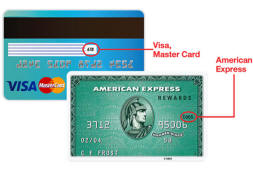 For
MasterCard, VISA and Discover cards, flip your card over and look at the signature box.
You should see either the entire 16-digit credit
card number or just the last four digits followed by
a special 3-digit code. This
3-digit code is
your Card Security Code. For
MasterCard, VISA and Discover cards, flip your card over and look at the signature box.
You should see either the entire 16-digit credit
card number or just the last four digits followed by
a special 3-digit code. This
3-digit code is
your Card Security Code. For American
Express cards you will find the 4-digit code
on the front right of you card. |